RuneLite Plugins
RuneLite is a third party client for Old School RuneScape, a retro MMORPG built upon on the 2007 version of the original title. In addition to running the game, RuneLite also supports optional plugins from both the client developers and external contributors. Such external plugins must be submitted to the RuneLite team for review before being merged into the plugin-hub and becoming available for players.
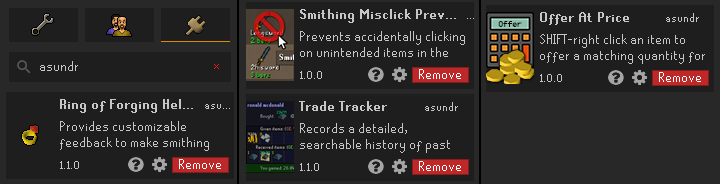
I’ve contributed 6 separate plugins to the project with an active install base of over 1000 daily users.
Contents
- Contributing a Plugin
- Plugin: Trade Tracker
- Plugin: Offer at Price
- Plugin: Trade Highlighter
- Plugin: Smithing MisClick Prevention
- Plugin: Chat Space Blocker
- Plugin: Ring of Forging Helper
Contributing a Plugin
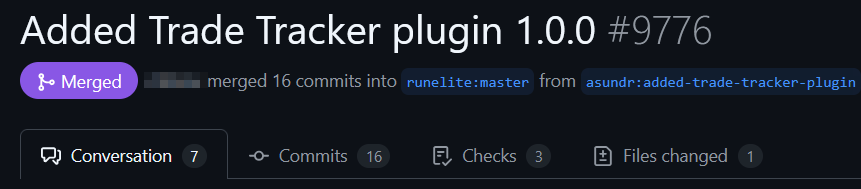
A step-by-step guide for building RuneLite plugins can be found on their plugin-hub page, with the gist of the process being that a developer must create the plugin using their example plugin project as a base. These are managed via the plugin-hub repository, with new plugins being added via a pull request of a uniquely named file that contains a link to the plugin repo and the SHA of the commit corresponding to the version being merged. Plugins are updated by creating a new PR that replaces that latest commit SHA. These PRs are reviewed by a maintainer of the RuneLite team for deprecated code and compliance with anti-cheating and anti-malware rules. Any issues with the plugin are commented on by the project maintainers and must be amended before the addition is merged.
Much like the based game and RuneLite client, plugins are written in Java and use the API provided by RuneLite to query and interact with the client. Although the core game logic cannot be touched, plugins may add additional content such as overlays, or make non-destructive changes to in-game menus. They also have access to their own plugin panel that is separate from the game and can be used to query, process and display game-related data. Players may tweak individual plugin behaviour using optionally provided config variables.
While developing these plugins my greatest hurdle tended to be finding detailed, up-to-date documentation. Fortunately, at this point many plugins already exist, and it's likely that either an official or external plugin has similar functionality to what a new plugin may require. The architecture is otherwise quite similar to the event-driven flow of making games, or writing scripts to mod them. Testing the functionality of a plugin can also be quite tricky, especially if it requires player-to-player interaction since it's being done in a live environment and without access to much of the game’s data under the hood. Overcoming these limitations requires conscious deployment of available debugging methods such as limiting the use of breakpoints to prevent disconnecting from the server, and using a combination of logging and directed trial-and-error to illuminate some of the more sparsely documented APIs.
Plugin: Trade Tracker


The Trade Tracker plugin records a detailed, searchable history of past trades between players and is the largest, most multi-featured plugin I’ve made to date. The bulk of its features are available via the plugin’s main panel which consists of a toolbar and a list of trade records constructed using Java’s Swing toolkit. These trade records track details such as the name of the traded player, the time of the trade, and a full list of items given and received. Aggregate prices for each trade are calculated and displayed, along with a summary panel for simple trades such as gifted items or a single type of item bartered for currency. Each record is collapsible to save space and has mouse-over text to provide additional details, and right click options for extra functionality such as adding notes to a trade or deleting the record.
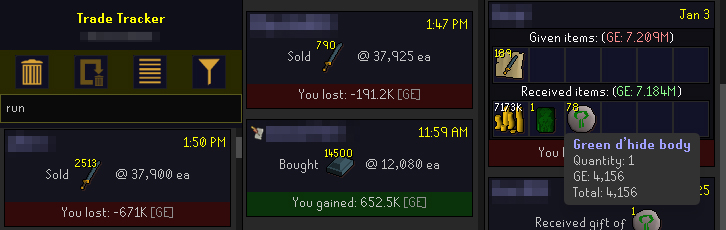
The toolbar provides the player with four buttons, including the options to clear all trades and toggle collapsed state of all records. Another button enables the auto-remove feature which deletes trades older than a configurable age. This uses a ScheduledExecutorService to manage the timer in its own thread and warns the player if configured settings are going to immediately delete any trades. The fourth button toggles the text filter used to search past trades. The query performs string comparisons against any and all relevant data in the trade including player name, notes, item names, prices, and quantities, along with aggregate values. This can be expensive for a large number of records creating a perceivable delay, so I parallelized the search to mitigate this.
Although RuneLite doesn’t have an API to directly listen to trade events it’s possible to use proxy events to infer the state of a trade and when one has been accepted. These events include tracking when the trade window opens and closes, and chat confirmation messages for when a trade is accepted. Using workarounds such as this is often a necessity when building plugins since access to the underlying events are not accessible.
In order for trade histories to persist between play sessions I needed a system to save and restore a player’s trade data. In the same way that that a plugin’s configuration settings are saved, plugins can associate a string key with a string value that is saved to disk. This means that the array of trade data can be saved to a json string that can later be used to rebuild the array. This is theoretically fine, but in practice the size limitations of the string values significantly limits the maximum number of savable trades. To address this, I first compressed the array data and encoded the resulting byte array using base64 to generate a lossless string that was only about 16% the size of the original json. Further optimizations involved removing null values from the original json and ensuring that derived values on the trade data class were marked as transient to prevent serialization. Since each player character and game mode have their own trade histories, a unique key is generated for each history using the player’s hash and the current game mode.
Plugin: Offer at Price


Typically, when players trade with each other they only have the option to offer a specified quantity of items. This plugin provides a way for players to match a quantity of items or coins by providing a price per item instead. Since RuneLite doesn’t provide plugins with the ability to offer items in trades directly, the plugin works by intercepting the existing "Offer-X" option on the item’s right click menu. It does this by adding a callback function that is executed after the price value has been submitted. This callback, queries the number of items offered by the other player, and uses the entered value to calculate the current player’s offer. Depending on whether the player is buying items with coins, or selling items for them, it will multiply or divide the provided values accordingly.
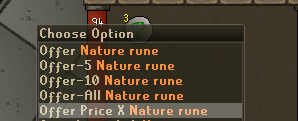
Since the plugin is really just using the "Offer-X" menu under the hood, it sets the menu text to indicate the change in execution and replaces the quantity entry prompt to ask for a price and display the calculated quantity. In case the player has already offered too many items, or they lack the total number of items needed to match the other player’s offer, they are notified accordingly.
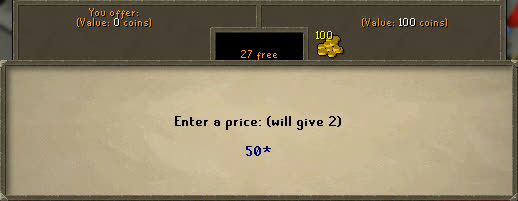
The option to offer at price is only available under certain conditions. Firstly, they player must Shift-click the item so that they still have a way to access the regular "Offer-X" option. If this condition is met, the potentially offered item must be a valid counter offer: meaning that the other player must have offered only a single type of item or coins, and that the resulting trade would be one that trades a single type of item for currency. The plugin supports noted items and treats both coins and platinum as an aggregate currency when offered.
Plugin: Trade Highlighter


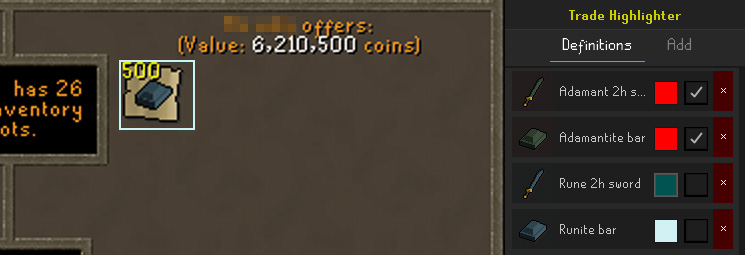
This plugin highlights items and optionally notifies the player when select items are offered by ther other player in a trade. Players can define a rules for each unique tradable item including setting the colour of the highlight and determining whether this item should notify the player when it has been added to the trade window. The plugin can also be configured to have the highlighting and notification active when entering the trade confirmation menu. This feature can be useful for detecting 'item swap' scams where unscrupulous players will replace a more expensive item in a trade for a cheaper, similarly looking alternative.
Plugin: Smithing MisClick Prevention


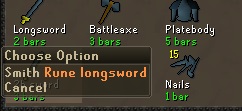
When smithing many items in succession it’s not uncommon to click the wrong recipe which can result in a costly mistake. This is a simple plugin that intercepts left clicks on recipes and replaces them with their right click menu equivalent in a way that is compliant with RuneLite's rules for menu interactions. The recipes effected by this change can be toggled by the player, and the settings include configurable regex queries to make the plugin more futureproof.
Plugin: Chat Space Blocker


For many menus in the game, the player can press space to repeat their last action. This can streamline interactions but can have the side effects of filling the chatbox with whitespace. The game has multiple chat channels that can be posted to by prefixing a chat message with a '/' character among others and since the preceding whitespace isn't trimmed when sending a message this can cause messages to be sent to the wrong channel. This plugin intercepts key inputs and blocks whitespace if the drafted message is blank. Players can intentionally enter preceding whitespace by holding shift.
Plugin: Ring of Forging Helper


This was the first plugin I created, some years prior to making the others. It’s a visual / audio aid that adds a widget displaying the current charges of the player’s ring of forging, warns them if they’re not wearing the ring, and highlights the banked item they need to select next. The RoF is used to smelt iron with 100% success, consuming one of the ring’s charges each time, and destroying it once all charges are expended. When the player isn’t wearing a ring, the ring is highlighted in the bank, otherwise the plugin highlights iron ore. The moment the ring is destroyed, it also notifies the player. All of these options can be enabled and customized in the plugin config.
As is often the case with playing moddable games, I frequently end up spending more time tweaking the games than actually playing them. On the occasion I find myself with that nostalgic itch for a session of Old School RuneScape, the outcome isn’t so different. Now, when I’m irked by an interaction I’d like to tweak or am struck by a feature I’d like to add, the existence of RuneLite and its plugin ecosystem enables me to do just that. For a game that I played as a kid so many years ago, long before I was ever a game developer or even a programmer, it doesn't stop feeling surreal to be able to contribute to the experience of the game: not just for myself but for everyone that has found value in those contributions.